+86-18050089566(WhatsApp/wechat)
+86-18050089566(WhatsApp/wechat)


Time:2026-09-15 Views:563
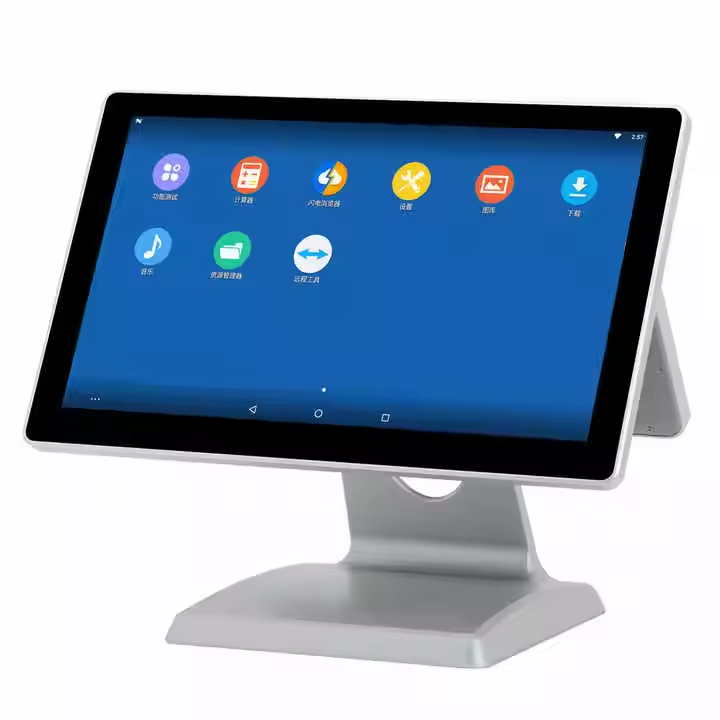
A cash register system needs to do more than process transactions. You need a reliable platform that supports daily operations while fitting the limited counter space of a retail store, restaurant, supermarket, or service business. A system that is difficult to operate, lacks connectivity, or uses an unsuitable display can slow your staff down and create unnecessary workflow problems. The EDOO ED60 addresses these needs with an integrated Windows 10 platform, 10 point capacitive touch screen, dual screen configuration, WiFi, Bluetooth, and optional 4G connectivity. With 4G or 6G/8G RAM options and 64GB, 128GB, or 256GB storage, you can select a configuration that matches your operational requirements.
Your POS environment may need to run Windows based software, connect with peripherals, and support different business workflows. Therefore, choosing a Windows cash register system can give you greater flexibility when your existing software and operational tools depend on the Windows ecosystem.
The EDOO ED60 uses an Intel Celeron J4125 processor with a maximum frequency of up to 2.70 GHz. It also provides multiple memory and storage configurations, allowing you to select hardware according to your application.
Key hardware features include:
Windows operating system
Intel Celeron J4125 processor
4GB, 6GB, or 8GB RAM options
64GB, 128GB, or 256GB storage options
10 point capacitive touch panel
15.6 inch main display
Optional 15.6 inch or 11.6 inch second display
WiFi and Bluetooth connectivity
Optional 4G connectivity
RS232, VGA, USB 2.0, LAN, MIC IN, and LINE OUT interfaces
This configuration makes the ED60 suitable for businesses that require a touchscreen POS terminal with multiple connectivity options.
A dual screen cash register system can improve interaction between your staff and customers. The main screen can support cashier operations, while the optional second screen can provide a customer-facing display depending on your software and workflow.
For retail chain stores, supermarkets, and convenience stores, this configuration can help you organize checkout operations within a compact counter setup. Clothing boutiques and beauty stores can also use the system as part of a centralized sales and customer service workflow.
Restaurants and cafes need quick order processing and a straightforward interface. The ED60 combines a 15.6 inch capacitive touchscreen with Windows compatibility, giving you a practical platform for restaurant POS applications.
The same concept applies to hotels, pharmacies, hair salons, gyms, and other service businesses. You can configure the system around your existing software and peripheral requirements instead of replacing your entire workflow.
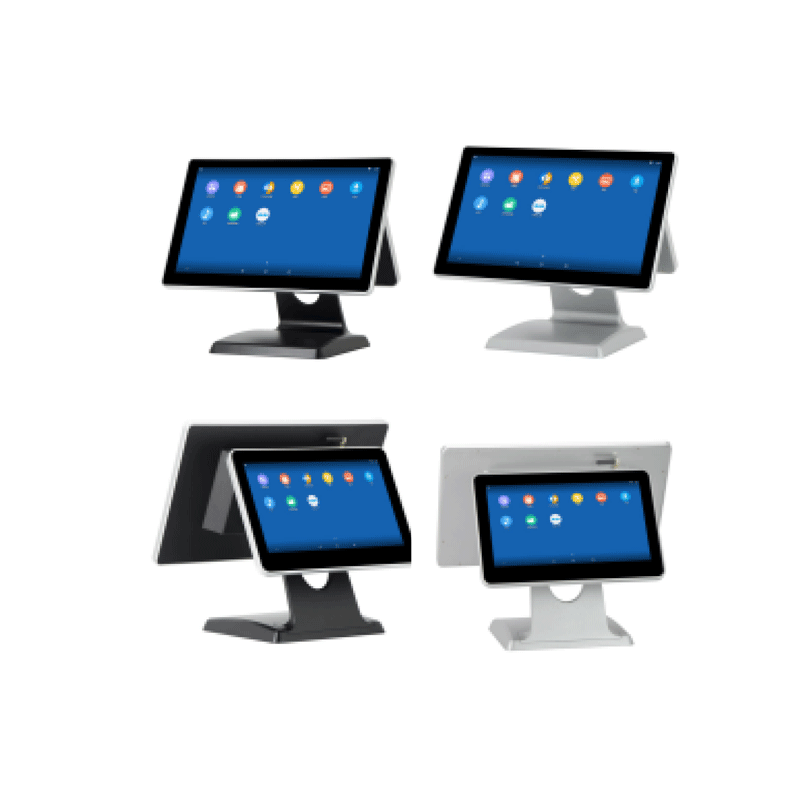
The following specifications help you evaluate whether the ED60 fits your POS environment.
| Feature | EDOO ED60 Specification |
|---|---|
| Processor | Intel Celeron J4125, up to 2.70 GHz |
| Operating System | Windows |
| RAM | 4GB / 6GB / 8GB |
| Storage | 64GB / 128GB / 256GB |
| Touchscreen | 10 point capacitive touch |
| Main Display | 15.6 inch |
| Second Display | 15.6 inch or 11.6 inch optional |
| Wireless | WiFi, Bluetooth |
| Mobile Connectivity | 4G optional |
| Interfaces | RS232, VGA, USB 2.0, LAN, MIC IN, LINE OUT |
| Dimensions | 390 x 200 x 320 mm |
| Weight | Approximately 4 kg for one screen |
| Color | Black / Silver |
The 390 x 200 x 320 mm body provides an integrated form factor for businesses that want to reduce separate equipment around the checkout area.
Before purchasing a cash register system, you should evaluate your software, connectivity, display, and expansion requirements.
Define your application
Determine whether you need the system for retail, restaurants, supermarkets, pharmacies, hotels, or another service environment.
Check operating system compatibility
Confirm that your POS software and related applications work with the selected Windows environment.
Select memory and storage
Choose 4GB, 6GB, or 8GB RAM and 64GB, 128GB, or 256GB storage according to your software and data requirements.
Evaluate display requirements
Decide whether a single 15.6 inch screen is sufficient or whether you need the optional second display.
Review connectivity
Check whether WiFi, Bluetooth, optional 4G, USB, RS232, LAN, or other interfaces are required for your peripherals.
Discuss customization
If standard configurations do not match your project, communicate your hardware and software requirements with EDOO before ordering.
EDOO focuses on IoT devices and scanning technology, with products used across logistics, healthcare, education, insurance, government, transportation, tobacco, and retail applications.
The company maintains an R&D system supported by senior technical experts and holds dozens of national patents. Its product portfolio includes 1D and 2D barcode scanners, handheld scanners, wireless scanners, barcode scan engines, fixed-mount scanners, desktop scanners, industrial PDAs, tablets, printers, POS products, and cash registers.
EDOO also provides OEM and ODM services. For ODM projects, the company supports the process from concept design and development through prototype evaluation and final product delivery.
Its documented qualifications include a Desktop Barcode Scanner CE Certificate, EDOO M93 PDA Terminal CE Certificate, EDOO M73 PDA Terminal CE Certificate, barcode scanner module CE certification, and RoHS certification. These certifications can provide useful reference points when you evaluate equipment for international deployment.
You can use the ED60 in retail stores, supermarkets, convenience stores, restaurants, cafes, clothing boutiques, beauty shops, hotels, pharmacies, hair salons, and gyms.
Yes. The ED60 uses a 15.6 inch main display and supports an optional 15.6 inch or 11.6 inch second display, depending on the configuration.
Yes. EDOO offers OEM and ODM services. You can discuss hardware configuration, product design, and project requirements with its technical team before production.
Choosing the right cash register system requires you to consider software compatibility, display configuration, connectivity, storage, and the actual needs of your business. The EDOO ED60 combines Windows compatibility, a 15.6 inch capacitive touchscreen, optional dual screens, WiFi, Bluetooth, optional 4G, and multiple I/O interfaces in an integrated POS design. With EDOO experience in IoT devices, barcode scanning technology, OEM and ODM development, the ED60 can serve as a practical hardware platform for retail, restaurant, and other commercial applications.
ABOUT US

PRODUCT
Solution
SERVICES
NEWS